AI can generate a website concept in minutes. But turning that concept into a professional, search-friendly website that represents your business, preserves existing rankings, and converts visitors into customers requires much more than a prompt.
In 2027, website redesign is no longer simply about choosing a new theme, updating colors, replacing images, and publishing a more modern homepage.
Businesses are working with AI-assisted design tools, Figma prototypes, WordPress page builders, Wix, Squarespace, Shopify, Webflow, and increasingly sophisticated content management systems.
These technologies make website production more accessible. They can accelerate research, layout exploration, content organization, and repetitive development tasks.
But accessibility doesn’t eliminate the need for design judgment, brand consistency, technical expertise, SEO knowledge, or proper execution.
A redesigned website still needs to answer fundamental questions:
What does the business offer, and who is its ideal customer?
What should visitors understand within the first few seconds?
How should services, locations, products, and supporting content be organized?
Which existing pages, rankings, backlinks, and URLs need to be preserved?
How will the website look and function on mobile devices?
What content, photography, and trust signals are needed?
How will the website generate enquiries, bookings, or sales?
Who will maintain and improve it after launch?
For contractors, professional service businesses, ecommerce brands, consultants, and growing companies, these decisions can determine whether a redesign becomes a valuable business investment or an expensive visual refresh.
This guide explains the complete website redesign process for 2027, including AI-assisted planning, mockups, branding, content strategy, WordPress and other CMS platforms, technical development, SEO migration, launch testing, and post-launch optimization.
1. What Is a Website Redesign in 2027?
A website redesign is the process of improving an existing website’s appearance, structure, usability, content, functionality, or technical foundation.
Depending on the business, it may involve a relatively small visual update or a complete reconstruction.
The important distinction is between changing how a website looks and improving how the website works.
A contractor might need a redesigned homepage, better service pages, project galleries, and clearer estimate forms.
A consultant might need a stronger personal brand, better positioning, case studies, and consultation booking.
An ecommerce business might need improved collection navigation, product presentation, checkout usability, and conversion tracking.
A growing company might need an entirely new content architecture that supports additional services, locations, and marketing campaigns.
Five common types of website redesign
| Redesign type | What changes | Typical business need |
|---|---|---|
| Visual refresh | Colors, typography, imagery, spacing | Modernize an established brand |
| UX and conversion redesign | Navigation, forms, CTAs, page flow | Improve enquiries or sales |
| Content and SEO restructuring | Pages, headings, URLs, internal links | Improve relevance and discoverability |
| CMS redesign or migration | Themes, templates, platform, backend | Improve flexibility and maintainability |
| Full strategic redesign | Branding, content, UX, SEO, development | Reposition or scale the business |
Not every business needs the most expensive option.
A well-performing WordPress website may benefit from targeted improvements without replacing its entire architecture.
Conversely, a website built around outdated content, confusing navigation, and restrictive templates may require a more comprehensive redesign.
The right scope begins with understanding what is already working and what genuinely needs to change.
2. Step One: Audit the Existing Website Before Designing Anything
One of the most expensive website redesign mistakes is beginning with the visual design before understanding the existing website.
A business owner may say:
“Our website looks old. We need something modern.”
That may be true.
But the current website might already have service pages generating organic traffic, location pages attracting qualified enquiries, backlinks pointing to important URLs, and blog articles supporting customer research.
Replacing everything without reviewing those assets creates unnecessary risk.
What should a website redesign audit include?
Website performance: Review mobile usability, page speed, Core Web Vitals, and important technical issues.
Search visibility: Identify organic landing pages, search queries, indexed URLs, and relevant rankings.
Content quality: Evaluate whether existing pages accurately describe services, products, locations, and expertise.
Conversion performance: Review forms, phone calls, booking flows, ecommerce purchases, and other meaningful actions.
Design consistency: Examine typography, colors, imagery, spacing, component reuse, and mobile layouts.
Technical condition: Review the CMS, theme, plugins, integrations, hosting, and maintenance requirements.
Website architecture: Determine whether visitors can easily find important information.
The importance of a baseline
Before making changes, document important performance indicators.
These may include organic search clicks, conversions, top landing pages, indexed URLs, important backlinks, and current site architecture.
This provides a reference for evaluating the redesign after launch.
Without a baseline, it becomes difficult to distinguish improvements from normal fluctuations in search demand or website traffic.
3. Step Two: Define the Brand Before Choosing the Website Layout
A professional redesign begins with understanding the business.
AI tools can suggest attractive color palettes, hero sections, and visual styles.
But they cannot independently determine the most appropriate brand positioning without accurate business context and human judgment.
A luxury home builder should not necessarily look like an emergency plumbing service.
A personal branding website for an executive should not automatically use the same visual language as a Shopify fashion store.
A commercial construction company may need a different tone from a boutique landscaping studio.
What should a website branding brief include?
A useful brief defines the business’s positioning, target audience, primary services, differentiators, visual preferences, communication style, and conversion objectives.
It should also identify the brand assets already available.
These may include logos, color systems, typography, photography, icons, videos, testimonials, and other approved materials.
Why branding matters for conversions
Visitors make judgments about clarity, credibility, and relevance while navigating a website.
Consistent branding helps them understand whether the business is appropriate for their needs.
For example, a premium remodeling company might benefit from large project photography, refined typography, restrained colors, and detailed project explanations.
An emergency HVAC contractor may prioritize prominent phone numbers, service availability, clear repair information, and mobile-friendly calls to action.
Both websites can look professional.
But their design decisions should reflect different customer journeys.
Good branding is not simply making every website look expensive. It is making the right business feel credible to the right audience.
4. Step Three: Use AI for Website Planning — Not as a Replacement for Strategy
AI-assisted website design is one of the most useful developments in modern digital production.
It can help designers, developers, marketers, and business owners explore possibilities faster.
For example, AI can assist with:
Early layout concepts and visual directions.
Sitemap brainstorming and content outlines.
Draft service-page structures.
Alternative headline and CTA ideas.
Wireframe exploration.
Design-system documentation.
Image concepts and creative references.
Development assistance and code review.
Content inventories and migration planning.
Accessibility and usability review checklists.
These capabilities can reduce repetitive work and make early exploration more efficient.
But generated output still needs verification.
What AI doesn’t automatically understand
AI may generate a beautiful contractor homepage without understanding the company’s actual services, project capabilities, service areas, or customer acquisition priorities.
It may suggest location pages for cities the business doesn’t serve.
It may produce generic testimonials or unsupported claims.
It may generate attractive layouts that don’t work well on mobile.
It may recommend removing existing pages that contribute valuable organic traffic.
It can also produce code that appears functional but contains accessibility, security, performance, or integration problems.
The right AI-assisted workflow
Business strategy → AI-assisted exploration → human review → approved design → technical development → testing.
AI should help the team explore and execute more efficiently.
It should not become the sole decision-maker for branding, SEO architecture, content accuracy, or production quality.
In 2027, the differentiator is increasingly not whether a designer uses AI.
It is whether the designer knows what to ask, what to preserve, what to reject, and how to turn a concept into a functioning website.
5. Step Four: Why Website Mockups and Figma Designs Still Matter
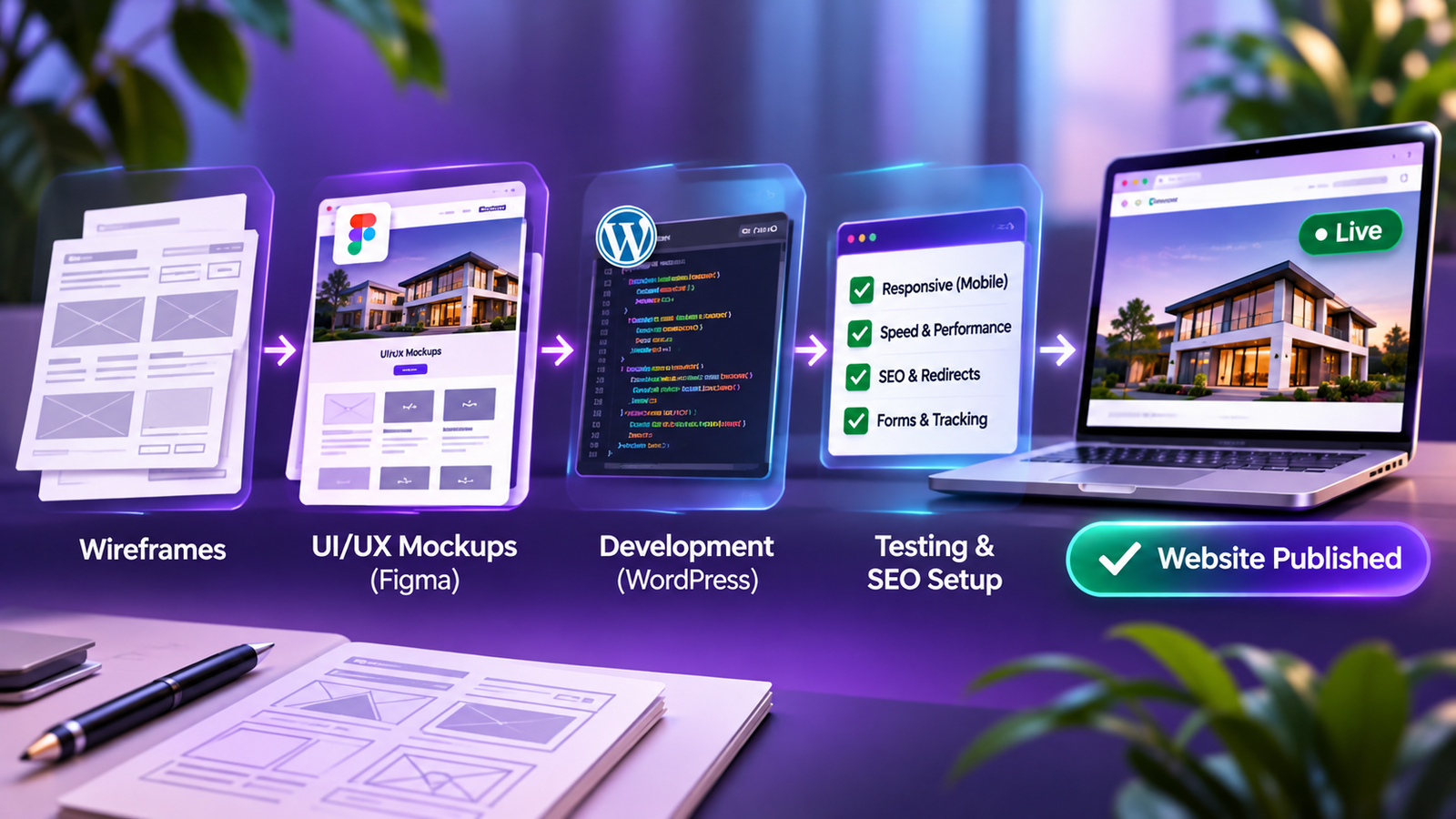
If AI can generate a homepage concept in seconds, why spend time creating mockups?
Because a generated visual concept is not the same as an approved, buildable website design.
A proper design process helps translate business goals into consistent, responsive, reusable interfaces.
Wireframes establish structure
Wireframes focus on content hierarchy and functionality before detailed visual styling.
For a contractor homepage, a wireframe might define:
Hero section and primary call to action.
Core services.
Service-area coverage.
Project gallery.
Reviews and trust signals.
Company qualifications and experience.
Frequently asked questions.
Estimate request or consultation form.
The exact structure depends on the business and its customers.
The purpose is to establish a logical experience before development begins.
High-fidelity mockups establish visual direction
A high-fidelity mockup introduces approved typography, colors, imagery, spacing, buttons, cards, and layout details.
Tools such as Figma can help teams evaluate the design before building it inside WordPress, Wix, Squarespace, or another platform.
Interactive prototypes help validate the experience
Prototypes can demonstrate navigation, menu behavior, mobile interactions, and important conversion paths.
They help stakeholders understand how the finished website should work.
Why skipping mockups can become expensive
Without an agreed design, developers may repeatedly rebuild sections as stakeholders change their preferences.
A business owner may approve a homepage concept but later discover that internal service pages, mobile layouts, or forms don’t follow the same visual system.
A design-first workflow reduces ambiguity.
It also gives developers a clearer specification for implementation.
Mockups are not unnecessary overhead. They are a way to reduce uncertainty before development becomes more expensive to change.
6. Step Five: Build the Website Architecture Around Services, Content and Search Intent
One of the most important parts of a website redesign is often invisible in the finished design.
It is the website’s information architecture.
This determines how pages are organized, how visitors navigate between them, and how search engines discover related content.
Example: A contractor website
A remodeling contractor might need:
Homepage: Introduces the company, service coverage, positioning, and main conversion paths.
Core services: Whole-home remodeling, kitchen remodeling, bathroom remodeling, additions, or other services genuinely offered.
Project portfolio: Completed work, photographs, project descriptions, and relevant location information.
Service areas: Accurate coverage of cities and communities where the company operates.
About and trust pages: Company background, qualifications, team information, and customer evidence.
Supporting articles: Useful answers to homeowner questions about renovation planning, project scope, materials, and timelines.
Contact and estimate pages: Clear paths for qualified enquiries.
Why SEO knowledge matters before development
A developer focused only on visual design may combine several important services into one generic page.
That can make the website harder to navigate and limit its ability to address distinct search intents.
Another developer might create dozens of nearly identical location pages, assuming that more pages automatically mean better SEO.
That can produce thin, repetitive content without meaningful customer value.
The right structure balances user experience, real service offerings, search intent, and maintainability.
Don’t create a page for every keyword
A website should not need separate pages for every slight variation of a search phrase.
For example, “roofing company website redesign” and “WordPress redesign for roofing contractors” may be related enough to address within one strong page.
But a service page about roofing website development and an informational article about preserving SEO during redesign serve different purposes.
A thoughtful architecture distinguishes these intents rather than creating unnecessary overlap.
7. Step Six: Choose the Right Platform — WordPress, Wix, Squarespace, Shopify or Webflow
Choosing a content management system is an important technical decision, but it should follow the website’s business requirements.
A company does not automatically need to migrate from Wix to WordPress simply because it wants a redesign.
Similarly, WordPress is not necessarily the right choice for every ecommerce storefront.
WordPress website redesign
WordPress is a flexible option for service businesses, contractors, publishers, and companies requiring extensive content architecture.
It supports custom templates, service pages, internal linking, integrations, blogs, and specialized functionality.
WordPress can be particularly useful for businesses expanding into multiple services or geographic markets.
However, flexibility also introduces responsibilities.
Theme quality, plugin maintenance, hosting, security, performance, and development standards all matter.
For businesses considering this platform, explore Nfinity Media’s website design and development services.
Wix website redesign
Wix can be appropriate for businesses that want a visual website builder with managed hosting and straightforward editing.
A Wix redesign may involve improved branding, content organization, responsive layouts, SEO settings, and conversion paths.
Moving away from Wix is not automatically necessary to improve SEO.
The decision should depend on the site’s requirements and actual platform limitations.
Squarespace website redesign
Squarespace can work well for portfolios, consultants, creative professionals, and smaller service businesses.
Its templates and content tools can support polished, brand-focused websites.
A redesign may concentrate on content hierarchy, imagery, navigation, service descriptions, and enquiry forms.
The platform should be evaluated against the business’s required functionality and long-term content needs.
Shopify website redesign
Shopify is built around ecommerce.
A Shopify redesign may involve product-page layouts, collection architecture, navigation, merchandising, filtering, theme customization, checkout-related experiences, and conversion optimization.
Product and collection URL changes require particular care during SEO migrations.
A visually improved storefront should not come at the expense of losing valuable product visibility or breaking important shopping journeys.
Webflow website redesign
Webflow can be useful for design-led marketing websites that need visual control, responsive layouts, and structured content.
It may be appropriate for brands that prioritize custom visual presentation and streamlined content management.
As with any platform, the decision should account for SEO requirements, team workflows, integrations, maintenance, and future growth.
Which CMS is best for SEO?
No platform guarantees search rankings.
Search performance depends on content relevance, technical accessibility, page experience, internal linking, competition, and many other factors.
The right CMS is the one that allows the business to implement its website strategy reliably and maintain it over time.
8. Step Seven: Create the Content Before the Website Is Finished
One of the most common redesign problems is building beautiful page templates and leaving the content until the end.
The homepage is approved.
The animations look good.
The colors are finalized.
But the service descriptions are generic, the project galleries are incomplete, and the business hasn’t supplied the information needed to finish the website.
This creates delays and often weakens the final result.
Why content should influence design
Content determines how much space a section needs, how users understand the business, and which calls to action make sense.
A roofing service page needs different content from a luxury landscaping portfolio.
A consultant’s website needs different proof than an ecommerce store.
Designing every page around placeholder paragraphs can create layouts that fail when real content is introduced.
Content needed for a successful redesign
Service information: Accurate descriptions of what the company offers and who each service is for.
Business positioning: What makes the company relevant and different.
Location information: Real service areas, locations, and regional considerations.
Original photography: Projects, products, teams, facilities, or other relevant evidence.
Trust signals: Reviews, testimonials, credentials, project details, and verifiable claims.
Conversion copy: Clear explanations of what happens when someone requests an estimate, schedules a call, or places an order.
SEO metadata: Descriptive titles and meta descriptions for important pages.
Supporting content: FAQs, articles, guides, and resources that address customer questions.
Can AI write all the website content?
AI can assist with outlines, editing, structure, and first drafts.
But content should be reviewed against the business’s actual services, qualifications, and customer needs.
For example, AI should not invent contractor licenses, completed projects, customer testimonials, awards, or service locations.
The most useful content combines efficient production with accurate business knowledge and editorial judgment.
9. Step Eight: Redesign Without Losing Existing SEO Rankings
A website redesign can change the technical and content signals that search engines use to understand a website.
That is why SEO preservation should be part of the project from the beginning.
A common mistake is treating SEO as something to address after the new website goes live.
By then, important URLs may already have changed, valuable content may have been removed, and internal links may be broken.
The website redesign SEO preservation checklist
1. Crawl the existing website.
Document important URLs, status codes, headings, canonical tags, internal links, and other relevant technical information.
2. Review Google Search Console.
Identify important search queries, landing pages, indexing issues, and organic visibility patterns.
3. Identify pages worth preserving.
Some pages may already attract qualified visitors or have relevant backlinks.
These pages deserve careful review before they are consolidated, rewritten, or removed.
4. Create a URL mapping document.
Record each important existing URL and its planned destination.
Not every URL needs to change during a redesign.
When the existing URL remains relevant, preserving it may reduce unnecessary migration complexity.
5. Implement appropriate redirects.
When a page moves permanently, a server-side 301 redirect is generally appropriate.
Redirects should point to the closest relevant destination, not indiscriminately to the homepage.
6. Preserve valuable content and search intent.
A redesigned page should continue satisfying the needs that made it useful in the first place.
7. Review internal links.
Navigation, breadcrumbs, service pages, blog articles, and other internal links should point to the correct destinations.
8. Check canonical and indexing directives.
Make sure important production pages are not accidentally blocked by noindex, robots directives, or incorrect canonical tags.
9. Update XML sitemaps.
Include the intended indexable URLs and submit the appropriate sitemap through Google Search Console.
10. Test the production website after launch.
Verify redirects, indexing accessibility, page content, forms, analytics, and important user journeys.
Does preserving SEO guarantee rankings?
No.
Even carefully managed migrations can experience ranking and traffic fluctuations.
But documenting existing assets, minimizing unnecessary changes, and testing the migration reduces avoidable risk.
The objective is not to preserve every outdated design decision. It is to preserve valuable search equity while improving the website’s usefulness.
10. Step Nine: Design for Mobile Users, Accessibility and Real Conversions
A website can look impressive on a large desktop monitor and still perform poorly on a phone.
This is especially important for local service businesses.
A homeowner searching for an emergency electrician may need a phone number immediately.
Someone comparing luxury home builders may want to browse project galleries.
An ecommerce shopper may need straightforward filtering and checkout.
A successful redesign accounts for these different behaviors.
Mobile-first design considerations
Readable typography without unnecessary zooming.
Navigation that works on smaller screens.
Buttons and links with comfortable touch targets.
Images that adapt without obscuring important content.
Forms that are easy to complete.
Clear phone, booking, and enquiry actions.
Responsive spacing and page sections.
Fast, stable loading experiences.
Accessibility should be built into the design
Important considerations include readable contrast, descriptive form labels, meaningful image alternatives, keyboard accessibility, logical heading structure, and understandable navigation.
Accessibility is not merely a finishing checklist.
It should influence design decisions from the wireframe stage through final testing.
Conversion rate optimization during redesign
Conversion rate optimization, or CRO, focuses on helping relevant visitors complete meaningful actions.
For a contractor, that may mean requesting an estimate.
For a consultant, it may mean booking a discovery call.
For an ecommerce store, it may mean completing a purchase.
A redesign should make those actions easier without resorting to misleading urgency or intrusive interfaces.
11. Step Ten: Develop the Website Properly — Beyond the Visual Mockup
Once the design and content structure are approved, development turns the concept into a functioning website.
This involves much more than copying visual elements into a page builder.
WordPress development
A WordPress redesign may involve selecting or developing a suitable theme, building reusable templates, configuring plugins, implementing responsive layouts, and integrating forms or third-party services.
Developers may work with Elementor, Divi, Kadence, custom blocks, HTML, CSS, JavaScript, PHP, or other tools depending on the project.
The goal is not to use the largest number of technologies.
It is to create a maintainable implementation that meets the business requirements.
CMS content management
The website should be practical for the team that will maintain it.
If a contractor needs to add project galleries regularly, the backend should support that workflow.
If a business publishes articles every week, the content templates should be consistent.
If a company expands into additional locations, the architecture should support growth without requiring a complete redesign.
Forms, CRM and automation
Modern websites may need integrations with customer relationship management systems, booking tools, email notifications, lead-routing systems, and marketing automation.
These features require proper configuration and testing.
An enquiry form that looks beautiful but fails to deliver submissions is a serious business problem.
Security and performance
Development should also address updates, backups, permissions, hosting, caching, image optimization, and relevant security practices.
AI-generated code and third-party plugins should be reviewed rather than installed without evaluation.
12. Website Redesign for Contractors: Why the Process Is Different
Contractor websites have distinct requirements because customers often search for specific services in specific locations.
A general contractor, roofing company, HVAC business, pool builder, or electrician needs more than a generic homepage.
The website should communicate what the company does, where it operates, why customers should trust it, and how to request service.
WordPress redesign for California contractors
California contractors may serve highly competitive and geographically varied markets.
A company operating in Los Angeles, Orange County, or San Diego may need service-specific content, local relevance, project evidence, and carefully organized service areas.
For example, a remodeling contractor might need separate content for whole-home renovations, additions, and other distinct services.
A pool builder may need detailed galleries and design information.
An HVAC company may prioritize repair, replacement, and installation pages.
A California WordPress redesign should preserve useful existing search visibility while improving the website’s structure and conversion paths.
WordPress redesign for New York contractors
New York contractors may serve dense urban markets, suburban communities, or broader regional areas.
A company serving New York City and Long Island should accurately communicate its real operating coverage.
Website architecture may need to distinguish services, boroughs, counties, or other relevant locations without producing repetitive content.
For businesses with existing rankings, migration planning is particularly important.
Contractor website redesign across other markets
The same principles apply to contractors in Chicago, Miami, Tampa Bay, New Jersey, and other service markets.
However, content should reflect the actual industry and region.
An Illinois landscaping company should not use the same seasonal messaging as a South Florida landscaping business.
A Miami roofing contractor may need different service explanations from a roofing business in New York.
A luxury home builder should not use the same conversion strategy as an emergency plumbing service.
A successful contractor redesign combines reusable technical systems with content and design decisions tailored to the actual business.
For broader contractor marketing strategy, explore SEO for General Contractors in Los Angeles.
13. Website Redesign for Professional Services, Personal Brands and Ecommerce
Not every website redesign follows a contractor lead-generation model.
Professional service websites
Consultants, agencies, accountants, and other professionals often need strong positioning, service clarity, expertise, and consultation paths.
The design should help visitors understand the professional’s value and determine whether the service is relevant.
Personal branding websites
Founders, executives, creators, influencers, and public-facing professionals may need a website that connects their identity, expertise, portfolio, media presence, and branded search visibility.
This can include professional biographies, speaking engagements, articles, press coverage, and other verifiable information.
Explore Personal Branding SEO Services for the relationship between professional websites and search visibility.
Shopify and ecommerce redesign
Ecommerce websites need clear product discovery, persuasive product information, usable navigation, and reliable purchase journeys.
A redesign should also protect important product and collection URLs where possible.
For online stores, design and SEO need to work alongside merchandising, inventory, analytics, and conversion strategy.
The common principle
Different businesses require different interfaces.
But the underlying redesign process remains similar:
Understand the audience, establish the brand, plan the content, design the experience, develop carefully, preserve useful SEO assets, and measure results.
14. Step Eleven: Test the Website Before Launch
A finished-looking website is not necessarily ready to publish.
Pre-launch testing should cover both visual quality and functional reliability.
Essential pre-launch tests
| Area | What to verify |
|---|---|
| Desktop and mobile | Responsive layouts, typography, navigation |
| Forms | Successful submissions, notifications, validation |
| SEO | Metadata, canonicals, redirects, crawlability |
| Content | Accurate copy, images, links, service information |
| Accessibility | Labels, contrast, keyboard interactions |
| Performance | Loading behavior, image sizes, layout stability |
| Analytics | GA4, GTM, relevant conversion events |
| Integrations | CRM, email, booking and other connected services |
| Security | Updates, permissions, backups and HTTPS |
| CMS | Editing permissions, reusable templates, maintainability |
Why staging websites matter
For established websites, development should generally happen in a staging environment rather than directly on the production site.
This allows the team to review designs, test integrations, and identify issues without unnecessarily disrupting the live website.
However, staging environments must be configured carefully to avoid unintended indexing or exposing unfinished content.
Before launch, confirm that production indexing settings are correct and staging restrictions have not been transferred accidentally.
15. Step Twelve: Launch, Monitor and Improve
Website launch is a milestone, not the end of the redesign process.
After launch, the team should monitor technical behavior, search visibility, user engagement, and conversion performance.
The first 48 hours
Verify that important pages load, forms work, analytics are collecting data, and redirects behave as expected.
Check for accidental indexing restrictions and broken internal links.
The first 30 days
Review Google Search Console, important landing pages, indexing reports, mobile usability, and conversion events.
Compare performance against the pre-launch baseline while accounting for normal traffic variation.
The first 60–90 days
Continue monitoring important search queries, organic landing pages, lead quality, and user behavior.
Investigate material changes rather than assuming every ranking movement is caused by the redesign.
Use real data to prioritize additional improvements.
What should success look like?
A successful redesign may produce improvements in usability, clearer brand positioning, better conversion paths, easier content management, or stronger technical foundations.
Organic search growth may also be a goal, but it should not be assumed simply because the website looks better.
The success criteria should be agreed upon before the project begins.
16. How Long Does a Website Redesign Take in 2027?
Project timelines vary based on scope, content readiness, design approvals, technical complexity, and integrations.
A small visual refresh may take significantly less time than a complete website rebuild.
Illustrative redesign planning timeline
| Phase | Typical planning allowance |
|---|---|
| Discovery and audit | 1–2 weeks |
| Branding, sitemap and wireframes | 1–3 weeks |
| UI/UX mockups and approval | 1–3 weeks |
| Content preparation | 2–6 weeks, often overlapping |
| CMS development | 2–8+ weeks |
| SEO migration and testing | 1–3 weeks |
| Launch and stabilization | 1–2 weeks |
These are illustrative scheduling ranges, not guaranteed delivery timelines.
A small website can move faster, while a large ecommerce or multi-location business may require substantially more time.
Does AI make redesigns faster?
AI can reduce the time needed for certain drafting, research, coding, and design exploration tasks.
But stakeholder approvals, original content collection, integrations, testing, and migration planning still require attention.
Generating a layout faster does not automatically mean the complete project can be delivered safely in a fraction of the time.
17. How Much Does a Website Redesign Cost in 2027?
Website redesign costs depend on the scope of work.
A simple visual update using an existing CMS may require substantially less investment than a full redesign involving branding, custom Figma mockups, content development, technical SEO, integrations, and migration.
What increases redesign costs?
The number and complexity of page templates.
Whether branding and logo work are included.
Custom UI/UX design and interactive prototypes.
Content writing and photography.
CMS migration or major restructuring.
Custom development and integrations.
Ecommerce functionality.
Technical SEO audits and URL mapping.
Accessibility and performance requirements.
Testing, launch support, and ongoing maintenance.
Why the cheapest redesign may not be the least expensive
A low-cost redesign that ignores content, search visibility, and conversion tracking can create additional expenses later.
The business may need to repair broken URLs, rebuild missing pages, correct forms, or restore important integrations.
However, expensive design work is not automatically better either.
A good proposal should clearly explain the deliverables, exclusions, responsibilities, and expected process.
For more information about professional website planning, explore Nfinity Media’s web design and development services.
18. Common Website Redesign Mistakes to Avoid
Mistake 1: Starting with AI-generated visuals instead of business requirements
A visual concept should support the business strategy, not define it.
Mistake 2: Skipping wireframes and mockups
Without an agreed structure, design revisions can become expensive during development.
Mistake 3: Treating SEO as a post-launch task
Important content, URLs, and technical requirements should be reviewed before development.
Mistake 4: Rewriting every page without checking existing performance
Some pages may already serve valuable search intent and deserve careful preservation.
Mistake 5: Choosing a CMS solely because it is popular
The platform should match the business’s functionality, team capabilities, and growth plans.
Mistake 6: Using generic AI content throughout the website
Accurate services, original expertise, and credible business information matter more than filling pages quickly.
Mistake 7: Designing only the homepage
Internal service pages, mobile layouts, forms, portfolios, and navigation deserve equal attention.
Mistake 8: Ignoring analytics and conversion tracking
Without measurement, the business may struggle to evaluate whether the redesign improved outcomes.
Mistake 9: Launching without redirects or technical testing
Broken URLs and indexing mistakes can create avoidable problems.
Mistake 10: Assuming the website is finished forever
A useful website needs maintenance, content updates, performance monitoring, and ongoing improvements as the business evolves.
19. Website Redesign Checklist for 2027
Before beginning your next website redesign, confirm the following.
Strategy and discovery
Business goals and target audiences are defined.
Existing website performance has been reviewed.
Important organic pages and URLs have been identified.
The redesign scope and success criteria are documented.
Branding and design
Brand direction, typography, and colors are approved.
Sitemap and wireframes are reviewed.
Desktop and mobile mockups are prepared.
Important conversion paths are defined.
Content and SEO
Existing content is inventoried.
New content requirements are assigned.
Important URLs are preserved or mapped.
Metadata and internal linking are planned.
Original imagery and business information are available.
Development and launch
The CMS matches project requirements.
Responsive layouts are implemented.
Forms and integrations are tested.
Redirects and indexing settings are verified.
Analytics and conversion tracking work.
Backups and rollback procedures are available.
Post-launch
Search Console is monitored.
Important user journeys are tested.
Conversion data is reviewed.
Technical issues are addressed.
Future content and optimization priorities are documented.
20. Frequently Asked Questions About Website Redesign in 2027
What is the first step in a website redesign?
The first step is reviewing the existing website and defining the business goals. An audit should identify important content, technical issues, conversion problems, and valuable search visibility before new designs are created.
Can AI redesign an entire website?
AI can help generate layouts, content drafts, code, and visual concepts. However, a production-ready redesign still requires verification, business-specific content, technical implementation, accessibility considerations, and testing.
Do I still need Figma mockups if I use AI?
Mockups are useful for establishing consistent visual design, responsive layouts, component behavior, and stakeholder approval. AI-generated concepts can inform mockups but don’t automatically replace them.
Is WordPress better than Wix for SEO?
Neither platform guarantees better rankings. WordPress offers extensive customization and content flexibility, while Wix can support many standard SEO requirements. The right choice depends on website complexity, development needs, and business goals.
Can I redesign a Squarespace website without moving platforms?
Yes. Many Squarespace websites can be improved through layout, branding, content, navigation, and SEO changes without migrating to another CMS.
Will redesigning my website hurt SEO?
It can affect rankings and traffic, particularly when URLs, content, internal links, or indexing settings change. A careful migration plan can reduce avoidable risks, but rankings cannot be guaranteed.
Should I change all my URLs during a redesign?
No. Preserve useful existing URLs where practical. When changes are necessary, map the old URLs to relevant new destinations and implement appropriate redirects.
Does a website redesign automatically improve Google rankings?
No. Better design may improve usability and conversion performance, but organic rankings depend on many factors, including content relevance, technical accessibility, competition, and search behavior.
Should contractors redesign their websites differently from other businesses?
Contractors often need service-specific pages, accurate service-area information, project galleries, trust signals, and clear estimate requests. These requirements should influence both design and content architecture.
Do I need new content for a website redesign?
Not always. Some existing content can be retained and improved. Other pages may need substantial rewriting or new information to reflect current services and customer needs.
Can I redesign my Shopify store without losing product SEO?
Yes, with careful planning. Important product and collection URLs, content, internal links, structured data, and redirects should be reviewed during the project. Search performance may still fluctuate.
How long should a professional redesign take?
The timeline depends on project complexity, content readiness, design approvals, development requirements, and testing. Small projects may take weeks, while complex redesigns can take months.
Is a website redesign worth it if my current site already ranks?
It may be, particularly if usability, conversion rates, branding, or maintainability are limiting business performance. However, a redesign should preserve valuable existing SEO assets wherever practical.
Should SEO and website redesign be handled together?
Coordinating SEO and redesign work can reduce migration risks and help align site architecture, content, technical implementation, and conversion strategy. Not every redesign needs an ongoing SEO campaign, but existing search visibility should be considered.
21. Final Thoughts: AI Can Accelerate Design, but Strategy Makes the Website Valuable
Website redesign in 2027 is becoming faster, more accessible, and more technically sophisticated.
AI can generate visual concepts.
Figma can help teams prototype experiences.
WordPress, Wix, Squarespace, Shopify, and Webflow can support different business requirements.
Modern development tools can simplify repetitive tasks and make content management more flexible.
But none of these tools automatically creates a successful business website.
A strong redesign still depends on understanding the audience, defining the brand, organizing the content, designing useful experiences, executing the development properly, and protecting existing SEO assets.
For contractors, that may mean preserving valuable service rankings while creating a stronger foundation for qualified estimates.
For consultants and professionals, it may mean communicating expertise and making consultation booking easier.
For ecommerce businesses, it may mean improving product discovery, shopping experiences, and purchase conversions.
The goal isn’t simply to launch a more attractive website. It’s to build a website that is easier to find, easier to trust, easier to use, and easier to grow.
Planning a Website Redesign for 2027?
At Nfinity Media, we approach website design and redesign through a combination of brand direction, UI/UX planning, Figma mockups, WordPress and CMS development, technical SEO considerations, content architecture, and conversion-focused experiences.
We work across WordPress, Shopify, Wix, Squarespace, Webflow, and other website environments, with the platform and scope selected around the project’s actual needs.
Whether you’re redesigning an established contractor website, modernizing a professional services brand, improving an ecommerce storefront, or preparing for geographic expansion, the first step is understanding what already works and what needs improvement.
A redesign should preserve valuable existing assets while creating a more useful foundation for future growth.
Schedule a Website Redesign & Digital Growth Consultation
Published as a forward-looking website redesign planning guide for 2027. Platform features, AI capabilities, search experiences, and technical requirements may evolve. Website redesign outcomes and search performance are not guaranteed.